


Most companies know how many laptops they purchased last year.
Far fewer know how many they retired.
And even fewer can answer a question that is becoming increasingly common in sustainability meetings: what was the environmental impact of those devices after they left the business?
For years, retired technology was treated as an operational issue. Equipment reached the end of its useful life, IT arranged for disposal, and the organization moved on.
Today, that conversation looks different.
Investors, customers, and leadership teams are asking for measurable environmental data. Sustainability reports are expected to include numbers, methodologies, and evidence—not just statements about “responsible recycling.”
As a result, many organizations are discovering that retired IT assets can tell an important story about carbon emissions, water conservation, and resource recovery.
The challenge is knowing how to measure it.
Ten years ago, few sustainability reports mentioned laptops or servers.
Today, technology touches nearly every aspect of a business, and organizations are paying closer attention to Scope 3 emissions—the indirect emissions generated throughout their value chain.
Every computer has an environmental footprint long before it reaches an employee’s desk.
Raw materials must be extracted. Components are manufactured. Devices travel across multiple countries before finally arriving at their destination.
According to lifecycle assessments used by organizations such as the EPA, much of a computer’s environmental impact occurs during manufacturing rather than daily use.
That means extending the life of existing hardware—or ensuring materials are responsibly recovered at the end of life—can contribute to broader sustainability objectives.
For environmental leaders, this presents an opportunity.
Retired technology is no longer simply a disposal problem.
It is a source of measurable data.
One of the biggest misconceptions surrounding electronics recycling is that the outcome cannot be quantified.
In reality, several environmental metrics can be estimated using standardized lifecycle methodologies.
Organizations may calculate:
Greenhouse gas emissions avoided through material recovery.
Water conserved through reduced demand for virgin materials.
Pounds of electronics diverted from landfills.
Amounts of copper, aluminum, steel, and plastics recovered.
Devices refurbished and returned to productive use.
These figures allow sustainability teams to move beyond broad statements and provide tangible results in annual reports.
Instead of saying, “We recycled retired technology,” organizations can begin saying, “Our IT asset disposition program contributed to the recovery of X pounds of material and avoided an estimated Y metric tons of CO₂ emissions.”
That distinction matters when reports are reviewed by executives, board members, and investors.
Environmental reporting relies heavily on lifecycle assessment methodologies.
Organizations such as the EPA and other environmental agencies maintain datasets that estimate the emissions associated with extracting, manufacturing, transporting, and processing materials.
When electronics enter a responsible recovery stream, those models can estimate the environmental benefits associated with material recovery and reuse.
Copper offers a good example.
Recovering copper from existing devices typically requires significantly less energy than extracting and refining new material. Similar principles apply to aluminum, steel, and certain plastics used throughout modern electronics.
Water consumption follows a similar pattern.
Manufacturing technology requires substantial amounts of water across multiple stages of production. Extending device lifecycles and recovering materials can contribute to lower overall resource demand over time.
For sustainability teams, these calculations provide something increasingly valuable: evidence.
Environmental goals are becoming more ambitious every year. Quantifiable outcomes help organizations demonstrate progress rather than intentions.
Many organizations already collect data related to energy consumption, travel, and waste management.
Technology is often the missing piece.
A company may retire hundreds of laptops annually without maintaining detailed records of where those devices went, how materials were recovered, or what environmental benefits were generated as a result.
That is beginning to change.
More businesses are requesting certificates of recycling, chain-of-custody documentation, and environmental impact summaries as part of their IT asset disposition process.
At eSmart Recycling, we frequently work with organizations that want greater visibility into what happens after equipment leaves the building. Once environmental reporting becomes part of the conversation, retired technology starts looking less like waste and more like another source of operational insight.
Sustainability reporting continues to evolve.
General statements about recycling and environmental responsibility are gradually giving way to something more measurable: data.
Retired computers may not seem like an obvious place to look for environmental insights, but they represent a growing opportunity for organizations seeking to better understand their footprint.
After all, every device has a lifecycle.
The question is whether your organization is measuring the entire story.
ITAD stands for IT Asset Disposition and refers to the processes used to securely manage, reuse, recycle, or dispose of retired technology assets.
Scope 3 emissions are indirect emissions generated throughout an organization’s value chain, including purchased goods and end-of-life treatment of products and assets.
Yes. Material recovery and reuse can reduce the demand for virgin materials, which often require more energy and resources to produce.
Yes. Many organizations include IT asset disposition metrics, material recovery data, and environmental savings in sustainability reporting.
Organizations should consider requesting certificates of recycling, chain-of-custody documentation, and environmental impact reporting when available.
Fill out the form below to request your electronics recycling pickup.
We’ll coordinate the schedule logistics and follow up with next steps.
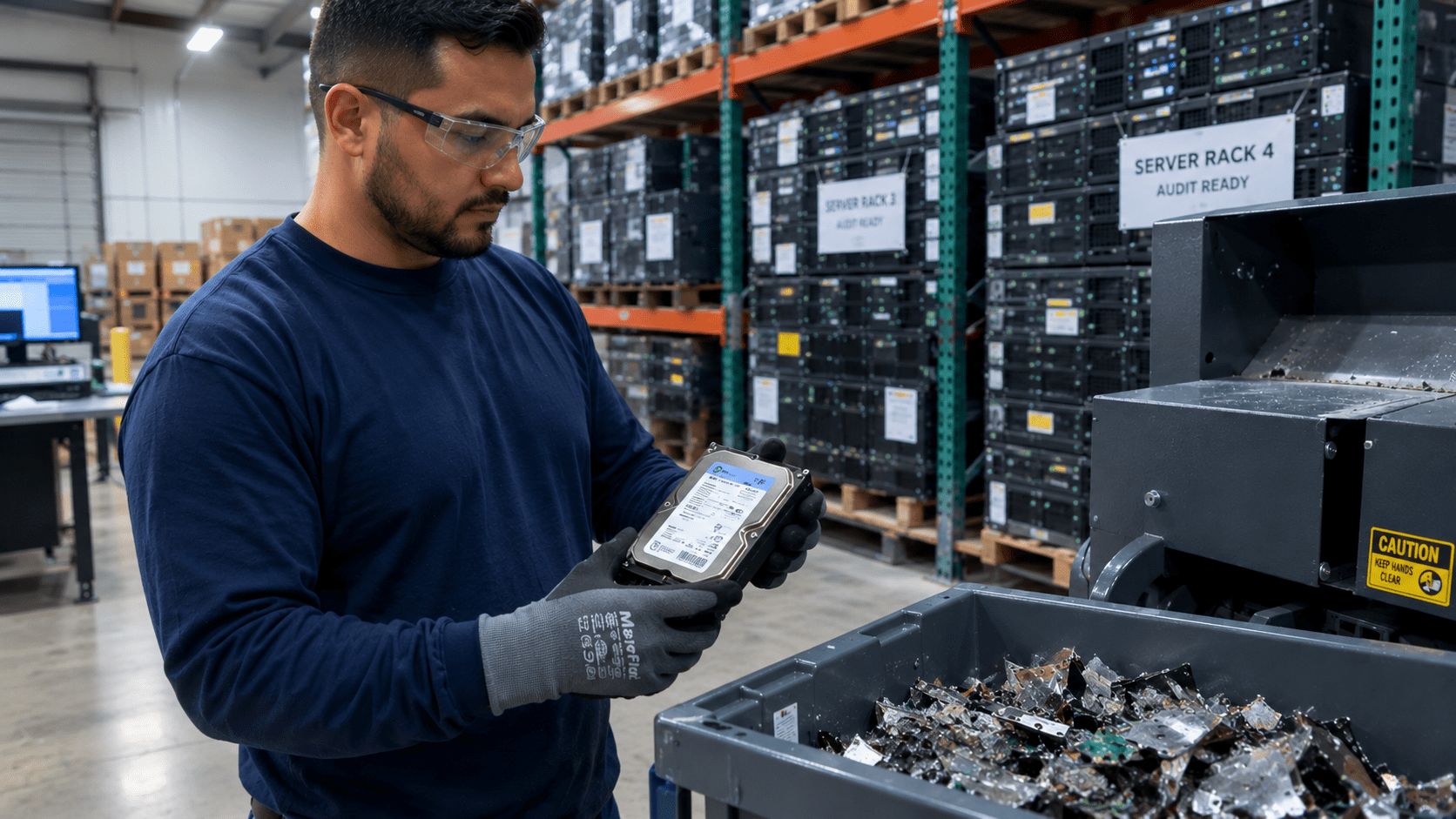
Managing corporate IT infrastructure demands end-to-end data security throughout the entire hardware lifecycle. Refreshing enterprise servers, desktop fleets, and mobile workstations introduces critical operational exposure the moment retired equipment leaves your direct physical custody.
Integrating verified regulatory frameworks into your IT Asset Disposition (ITAD) roadmap protects corporate confidentiality, streamlines complex third-party audits, and supports corporate sustainability milestones.
Direct answer: Corporate data destruction regulatory compliance is the structured execution of technical sanitization policies, unbroken chain-of-custody controls, and verifiable reporting mandated by standards such as HIPAA, FACTA, and NIST SP 800-88. Its core objective is the irreversible elimination of sensitive information from retired storage media, providing auditable certificates of destruction validated by certified processing facilities.
A formal data destruction program guarantees that every hard drive, server blade, and solid-state device maintains full chain-of-custody tracking from disconnect to final physical processing.
The National Institute of Standards and Technology establishes technical benchmarks through Special Publication 800-88 Rev. 1. This framework categorizes data sanitization into three distinct technical levels based on the asset’s subsequent destination and data sensitivity:
Technical action: Logical overwriting of all user-accessible storage sectors using certified data erasure software.
Applicable media: Traditional hard disk drives (HDDs) and solid-state drives (SSDs) scheduled for internal redeployment within the organization.
Risk coverage: Low to moderate; fits internal equipment reassignment across business departments.
Technical action: Execution of low-level firmware cryptographic erase commands or targeted magnetic field exposure (degaussing).
Applicable media: Enterprise storage arrays, database servers, and drives transitioning outside direct company control.
Risk coverage: High; fulfills privacy mandates against advanced laboratory data recovery attempts.
Technical action: Mechanical shredding, disintegration, or melting of physical storage media.
Applicable media: Damaged storage units, magnetic tapes, system motherboards, and flash storage where hardware reuse is unavailable.
Risk coverage: Critical; satisfies strict legal mandates for medical records, financial files, and defense contracts.
Federal statutes establish civil, administrative, and financial accountability for decommissioned hardware handling:
HIPAA Security Rule (Health Insurance Portability and Accountability Act): Mandates covered entities and business associates to establish final hardware disposition protocols for all equipment storing electronic Protected Health Information (ePHI). Unaccounted media drives trigger statutory data breach notifications and substantial regulatory fines.
FACTA Disposal Rule (Fair and Accurate Credit Transactions Act): Requires consumer-facing and financial organizations to implement reasonable, auditable measures to shred or pulverize consumer records, ensuring stored credit and identification information remains permanently unrecoverable.
Partnering with certified ITAD specialists eliminates third-party handling liability and validates compliance through serialized destruction certificates.
Information security relies on physical security controls as much as digital safeguards. Handing retired technology over to undocumented channels breaks your chain of custody and leaves sensitive data vulnerable.
The international R2v3 (Responsible Recycling) standard, backed by ISO 9001, ISO 14001, and ISO 45001 certifications, guarantees that processing facilities maintain 24/7 video monitoring, secure access control, and complete electronic documentation.
Our central processing warehouse provides documented serial-number tracking and mechanical hard drive shredding, delivering verified certificates of destruction for your compliance reporting.
Responsible IT asset disposition enables qualifying hardware to enter circular economy lifecycles through authorized sanitization protocols.
Through our collaboration with the Digital Education Foundation (DEF), securely cleared and refurbished devices are provided to schools and underserved community learning labs. This operational model strengthens corporate ESG (Environmental, Social, and Governance) scores, transforming routine IT decommissioning into verified social impact.
Your organization receives a certified Certificate of Data Destruction and Asset Disposition. This document details pickup and processing dates, complete equipment inventory with individual serial numbers, specific NIST 800-88 sanitization methods executed, and formal technical signatures from certified facility personnel.
Degaussing applies a high-intensity magnetic pulse that disrupts the magnetic domains on traditional spinning HDDs, rendering them unusable while preserving the drive chassis intact. Mechanical shredding fragments storage drives into small, irreversible particles, providing the standard destruction method for solid-state drives (SSDs) and high-security storage assets.
Yes. Executing NIST 800-88 Purge-level standards via certified cryptographic software permanently overwrites storage blocks, making data recovery impossible. This process preserves complete enterprise confidentiality while preparing operational hardware for community deployment through the Digital Education Foundation.
Streamline your corporate equipment retirement with a certified, transparent, and auditable process.
Our operations team manages scheduled logistics, serial-level asset scanning, physical data destruction, and responsible electronics recycling for your enterprise infrastructure.
Commercial requests and B2B consultations: Contact our team directly at josea@esmartrecycling.com or submit an inquiry through esmartrecycling.com
On-site facility audits: Visit our operational center at 5100 Vivian Place, Tampa, FL 33619.
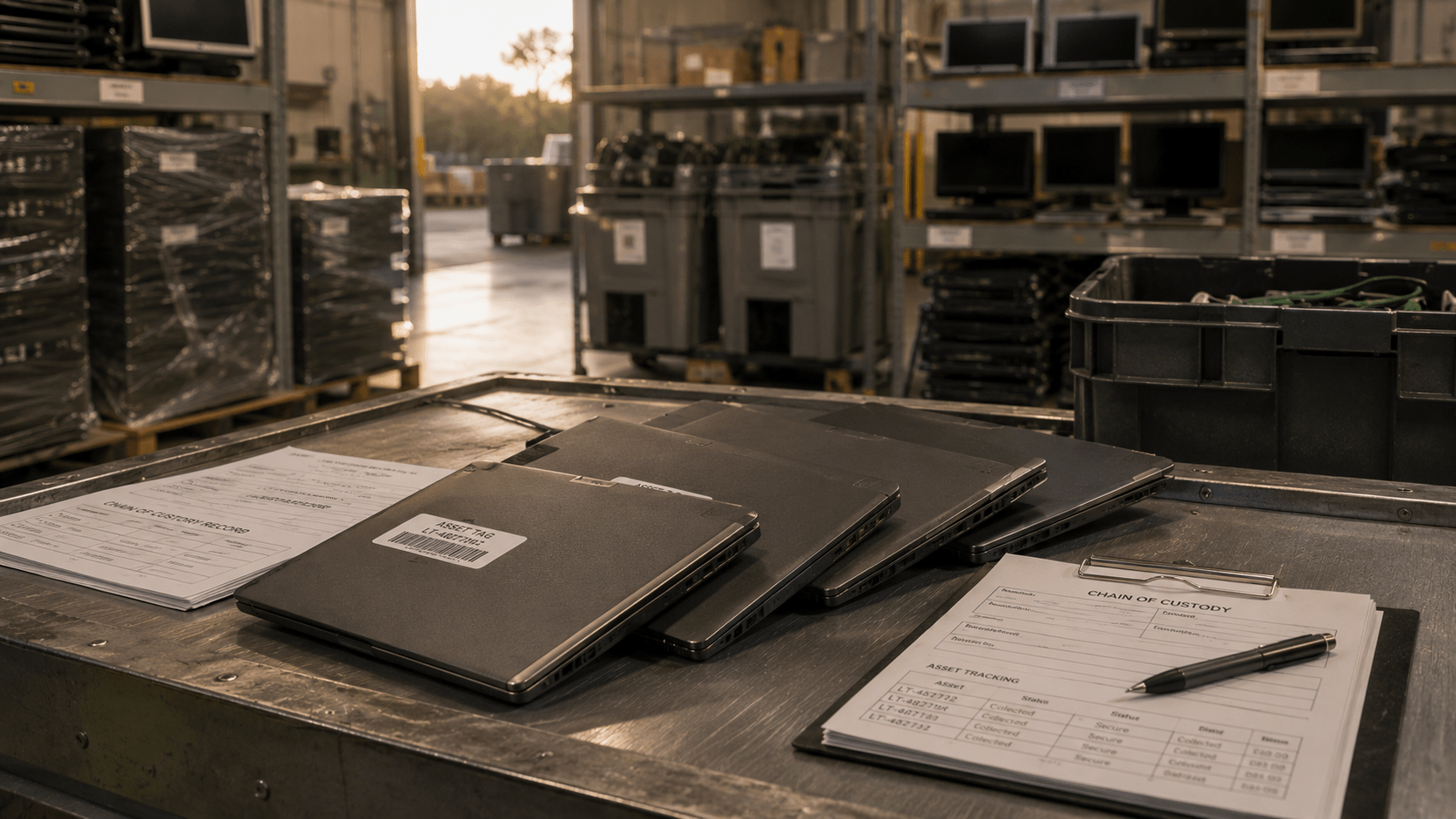
Most businesses can tell you exactly where a new laptop came from.
They know the manufacturer, the model number, the purchase date, and often the employee who used it.
Far fewer can tell you where that same laptop went after it left the building.
For many organizations, that part of the story ends at pickup.
The equipment is loaded onto a truck, a certificate is received a few days later, and everyone moves on to the next project. It feels like the end of the process.
In reality, it is often the beginning of another one.
Retired technology rarely disappears overnight. Devices are sorted, tested, dismantled, refurbished, recycled, or transferred through multiple downstream vendors before reaching their final destination. Depending on how that process is managed, the outcome can range from responsible material recovery to improper export and unsafe processing practices.
That is why more businesses are beginning to ask a question that would have seemed unusual a decade ago:
What actually happens to our equipment after it leaves the office?
There is a common assumption in technology recycling: once equipment changes hands, responsibility changes with it.
Environmental regulations are not always that simple.
Organizations are increasingly expected to demonstrate due diligence when selecting vendors responsible for handling retired assets. This is particularly true for companies operating in regulated industries or those publishing ESG and sustainability reports.
The reason is straightforward.
Electronics move through complex supply chains.
A laptop collected in Florida may pass through several facilities before materials are ultimately recovered. Along the way, devices can be reused, refurbished, dismantled, or transferred to downstream processors that specialize in specific materials.
Without visibility into that chain, businesses are left relying entirely on trust.
For leadership teams, that creates an uncomfortable situation: they may know where equipment started, but not where it ended.
The Basel Convention is an international treaty that governs the movement of hazardous waste between countries and seeks to reduce the transfer of waste to locations that lack the infrastructure to manage it safely.
Electronics occupy an important place in these discussions.
Improper handling of retired technology has contributed to well-documented environmental and public health issues in several regions around the world. As a result, governments and industry organizations have placed greater emphasis on accountability throughout the electronics recycling chain.
While businesses in Tampa Bay are unlikely to spend their afternoons reading international environmental treaties, the principles behind the Basel Convention still matter.
Companies increasingly want assurance that retired assets are being managed responsibly and that materials are not entering inappropriate or unauthorized channels.
For many organizations, this comes down to a simple question:
Can we demonstrate where our equipment went if someone asks?
One of the most widely recognized standards in the electronics recycling industry is R2v3, developed by Sustainable Electronics Recycling International (SERI).
R2v3 establishes requirements for areas including:
Data security.
Environmental management.
Worker health and safety.
Downstream vendor accountability.
Documentation and chain of custody.
Perhaps most importantly, the standard requires organizations to maintain visibility into downstream processes and demonstrate that materials are handled according to established requirements.
That visibility matters.
A certificate of recycling is valuable, but many businesses are now asking additional questions:
Who handled the equipment after collection?
Were downstream vendors qualified?
Were any materials exported?
Is there documentation supporting the process?
These conversations are becoming increasingly common as organizations place greater emphasis on compliance, governance, and sustainability reporting.
Selecting an IT asset disposition partner is no longer solely about convenience.
It is increasingly about transparency.
Before scheduling a pickup, organizations should consider asking:
How is the chain of custody documented?
Does the provider maintain downstream vendor records?
What certifications does the company hold?
How are data-bearing devices managed?
Are environmental and recycling reports available?
The answers do not need to be complicated.
In many cases, businesses are simply looking for confidence that retired equipment will be managed responsibly from beginning to end.
At eSmart Recycling, these conversations have become increasingly common over the past several years. Companies want to understand not only how their devices are collected, but also how they are tracked throughout the process. Visibility, documentation, and accountability have become just as important as the pickup itself.
Retiring a computer is easy.
Understanding what happens next is where things become more interesting.
Every piece of technology follows a path after it leaves the office. Sometimes that path is clearly documented. Sometimes it becomes difficult to follow after the loading dock doors close.
For organizations that care about compliance, sustainability, and risk management, visibility matters.
Because the question is no longer whether your equipment was collected.
It is whether you can confidently explain where it went afterward.
ITAD stands for IT Asset Disposition and refers to the secure management, reuse, recycling, and disposal of retired technology assets.
The Basel Convention is an international agreement designed to regulate the movement of hazardous waste and reduce unsafe waste transfers between countries.
R2v3 is a certification standard developed by SERI that establishes requirements for responsible electronics recycling, data security, environmental practices, and downstream accountability.
Chain of custody documentation helps organizations track retired assets throughout the disposition process and demonstrate accountability.
Organizations should ask about certifications, downstream vendors, chain-of-custody procedures, data destruction practices, and available reporting.

Every office has one.
Sometimes it’s a storage closet near the IT department. Sometimes it’s an empty cubicle that quietly became a holding area over the years. In larger organizations, it might be an entire room filled with old monitors, tangled cables, retired laptops, and equipment that nobody has touched since the last office renovation.
Most of it was supposed to be temporary.
A laptop was set aside because someone needed to confirm whether it had been wiped. A few monitors were saved “just in case.” Several boxes of cables survived three office moves because everyone assumed they might be useful someday.
Over time, those decisions add up.
What began as a practical solution becomes an operational problem: less storage space, unclear inventory records, and in some cases, equipment that has been sitting untouched for years.
That is why more organizations are beginning to schedule something that would have seemed unusual not long ago: a technology cleanout day.
A few hours of planning can help businesses reclaim space, improve visibility into their assets, and reduce risks associated with storing obsolete electronics.
There is a term for this phenomenon: IT hoarding.
It describes the tendency to retain outdated technology long after it has stopped providing value to the organization. In many cases, the reasons are understandable.
Someone is unsure whether the data has been removed. A department believes the equipment may eventually be needed again. Budget constraints delayed replacement plans, and the old devices simply remained where they were.
Eventually, nobody remembers why the equipment is still there.
A recent office walkthrough can be surprisingly revealing. It is not uncommon to find laptops from two generations ago, networking equipment with handwritten labels, and cables that connect to devices nobody in the building still uses.
The challenge is that retired technology occupies more than physical space.
It also creates uncertainty.
Without an inventory process, businesses often have difficulty answering basic questions:
How many retired devices do we currently have?
Which assets still contain storage media?
Are any batteries damaged or expanding?
Which items should be recycled, reused, or securely destroyed?
The longer equipment remains in storage, the harder those questions become to answer.
The most successful office cleanouts begin before anyone moves a single box.
Start by identifying where retired equipment is stored throughout the organization. It is common for devices to accumulate in multiple locations, particularly in companies that have expanded over time.
Once those areas have been identified, create a simple inventory that includes:
Device type.
Asset tag or serial number, if available.
Department owner.
Presence of storage media.
Physical condition.
Battery status.
This process does not need to be complicated. A spreadsheet is often enough.
The goal is visibility.
Many organizations are surprised by what they discover during this exercise. Equipment that was believed to be missing suddenly reappears. Devices assumed to be unusable are found in excellent condition. Occasionally, businesses discover assets they did not know they still owned.
An inventory also makes it significantly easier to coordinate with an IT asset disposition provider when the time comes for pickup.
Not every item in a storage room presents the same level of risk.
Lithium-ion batteries deserve particular attention.
Laptops, smartphones, tablets, UPS systems, and other portable devices often contain batteries that degrade over time. In some cases, older batteries can swell, leak, or become unstable if stored improperly.
The U.S. Environmental Protection Agency and other safety organizations recommend storing lithium batteries in cool, dry environments and separating damaged units from other materials whenever possible.
During a cleanout, employees should look for signs such as:
Swollen laptop casings.
Damaged battery packs.
Corrosion.
Excessive heat.
Physical damage to devices.
Identifying these items before transportation helps reduce the likelihood of incidents and allows them to be managed appropriately during collection and recycling.
For businesses that have not reviewed their retired equipment in several years, this step is often more important than expected.
The goal of a technology cleanout is not simply to remove equipment from the building.
It is to establish a repeatable process.
Many organizations have found success by scheduling annual or semiannual cleanout days and involving stakeholders from IT, Operations, Facilities, and Finance. With everyone aligned, decisions tend to happen more quickly.
A typical cleanout process may include:
Identifying storage locations.
Completing an asset inventory.
Separating devices with storage media.
Flagging lithium batteries requiring special handling.
Determining which equipment may be reused internally.
Preparing retired assets for collection.
Once those steps are complete, the remaining question becomes logistical: how does the equipment leave the building?
At eSmart Recycling, we often work with businesses that have spent years accumulating retired technology simply because there was never a dedicated process for addressing it. Once inventory documentation and pickup logistics are coordinated, organizations are usually surprised by how quickly they can reclaim storage space and close the chapter on equipment that has been sitting untouched for years.
Technology has a way of lingering.
Unlike office furniture or supplies, retired devices often remain nearby long after they have stopped being useful. They sit quietly in closets, storage rooms, and server spaces while other priorities take precedence.
Eventually, however, every organization reaches the same point.
Someone opens a door and asks, “Why are we still keeping all of this?”
A technology cleanout day will not solve every operational challenge, but it can create something valuable: visibility.
And once businesses know what they have, where it is, and what should happen next, those crowded storage rooms tend to become a lot smaller.
Many organizations benefit from conducting a cleanout once or twice per year, depending on the size of their IT environment and hardware replacement cycles.
IT hoarding refers to the accumulation of retired or obsolete technology that remains in storage without a defined plan for reuse, recycling, or disposal.
Lithium batteries can become unstable over time, particularly if they are damaged or stored improperly. They should be inspected periodically and handled according to applicable safety guidelines.
Yes. Maintaining an inventory improves asset visibility and simplifies logistics, documentation, and chain-of-custody processes.
Organizations frequently discover laptops, desktops, monitors, cables, networking equipment, servers, smartphones, printers, and miscellaneous accessories that have accumulated over several years.

Most companies know how many laptops they purchased last year.
Far fewer know how many they retired.
And even fewer can answer a question that is becoming increasingly common in sustainability meetings: what was the environmental impact of those devices after they left the business?
For years, retired technology was treated as an operational issue. Equipment reached the end of its useful life, IT arranged for disposal, and the organization moved on.
Today, that conversation looks different.
Investors, customers, and leadership teams are asking for measurable environmental data. Sustainability reports are expected to include numbers, methodologies, and evidence—not just statements about “responsible recycling.”
As a result, many organizations are discovering that retired IT assets can tell an important story about carbon emissions, water conservation, and resource recovery.
The challenge is knowing how to measure it.
Ten years ago, few sustainability reports mentioned laptops or servers.
Today, technology touches nearly every aspect of a business, and organizations are paying closer attention to Scope 3 emissions—the indirect emissions generated throughout their value chain.
Every computer has an environmental footprint long before it reaches an employee’s desk.
Raw materials must be extracted. Components are manufactured. Devices travel across multiple countries before finally arriving at their destination.
According to lifecycle assessments used by organizations such as the EPA, much of a computer’s environmental impact occurs during manufacturing rather than daily use.
That means extending the life of existing hardware—or ensuring materials are responsibly recovered at the end of life—can contribute to broader sustainability objectives.
For environmental leaders, this presents an opportunity.
Retired technology is no longer simply a disposal problem.
It is a source of measurable data.
One of the biggest misconceptions surrounding electronics recycling is that the outcome cannot be quantified.
In reality, several environmental metrics can be estimated using standardized lifecycle methodologies.
Organizations may calculate:
Greenhouse gas emissions avoided through material recovery.
Water conserved through reduced demand for virgin materials.
Pounds of electronics diverted from landfills.
Amounts of copper, aluminum, steel, and plastics recovered.
Devices refurbished and returned to productive use.
These figures allow sustainability teams to move beyond broad statements and provide tangible results in annual reports.
Instead of saying, “We recycled retired technology,” organizations can begin saying, “Our IT asset disposition program contributed to the recovery of X pounds of material and avoided an estimated Y metric tons of CO₂ emissions.”
That distinction matters when reports are reviewed by executives, board members, and investors.
Environmental reporting relies heavily on lifecycle assessment methodologies.
Organizations such as the EPA and other environmental agencies maintain datasets that estimate the emissions associated with extracting, manufacturing, transporting, and processing materials.
When electronics enter a responsible recovery stream, those models can estimate the environmental benefits associated with material recovery and reuse.
Copper offers a good example.
Recovering copper from existing devices typically requires significantly less energy than extracting and refining new material. Similar principles apply to aluminum, steel, and certain plastics used throughout modern electronics.
Water consumption follows a similar pattern.
Manufacturing technology requires substantial amounts of water across multiple stages of production. Extending device lifecycles and recovering materials can contribute to lower overall resource demand over time.
For sustainability teams, these calculations provide something increasingly valuable: evidence.
Environmental goals are becoming more ambitious every year. Quantifiable outcomes help organizations demonstrate progress rather than intentions.
Many organizations already collect data related to energy consumption, travel, and waste management.
Technology is often the missing piece.
A company may retire hundreds of laptops annually without maintaining detailed records of where those devices went, how materials were recovered, or what environmental benefits were generated as a result.
That is beginning to change.
More businesses are requesting certificates of recycling, chain-of-custody documentation, and environmental impact summaries as part of their IT asset disposition process.
At eSmart Recycling, we frequently work with organizations that want greater visibility into what happens after equipment leaves the building. Once environmental reporting becomes part of the conversation, retired technology starts looking less like waste and more like another source of operational insight.
Sustainability reporting continues to evolve.
General statements about recycling and environmental responsibility are gradually giving way to something more measurable: data.
Retired computers may not seem like an obvious place to look for environmental insights, but they represent a growing opportunity for organizations seeking to better understand their footprint.
After all, every device has a lifecycle.
The question is whether your organization is measuring the entire story.
ITAD stands for IT Asset Disposition and refers to the processes used to securely manage, reuse, recycle, or dispose of retired technology assets.
Scope 3 emissions are indirect emissions generated throughout an organization’s value chain, including purchased goods and end-of-life treatment of products and assets.
Yes. Material recovery and reuse can reduce the demand for virgin materials, which often require more energy and resources to produce.
Yes. Many organizations include IT asset disposition metrics, material recovery data, and environmental savings in sustainability reporting.
Organizations should consider requesting certificates of recycling, chain-of-custody documentation, and environmental impact reporting when available.

Replacing computers has become one of those tasks that almost nobody questions.
Every few years, the IT department reviews the asset inventory, Finance approves the budget, and dozens—or sometimes hundreds—of devices quietly begin their journey out of the office.
For decades, many organizations have operated under a simple rule: if a computer reaches its third birthday, it is time to replace it.
The logic is easy to understand. Newer equipment typically means fewer support tickets, active manufacturer warranties, and a more predictable technology environment. It also makes budgeting easier. After all, there is comfort in having a rule that applies to everyone.
But lately, a different question has started to appear in conversations between IT leaders, CFOs, and operations teams.
Do all of those devices actually need to be replaced at the same time?
The answer is becoming less obvious.
A business laptop purchased three years ago is not the same machine it would have been a decade earlier. Today’s hardware lasts longer, cloud applications demand less local processing power, and many employees spend their day moving between email, video calls, spreadsheets, and browser tabs.
In other words, the three-year rule may still be useful.
It just might not need to be universal.
The three-year rule was never a law. It was simply good operational advice.
Most enterprise hardware manufacturers offer warranties that range from three to five years, and many IT departments prefer to replace equipment before age-related failures become more common. For years, this approach made perfect sense. Hardware improvements were significant, support costs increased over time, and maintaining consistency across an organization was a priority.
There was also a financial component.
Technology assets depreciate quickly, and many businesses became accustomed to treating computers as short-term investments. By replacing them on a fixed schedule, organizations could better forecast expenses and avoid unexpected disruptions.
The challenge is that technology has evolved.
Not every device ages at the same pace, and not every employee uses their computer in the same way.
A laptop used for video editing has very different requirements than one assigned to Human Resources. A workstation that no longer meets the needs of a software developer may still have years of useful life in an administrative role.
That realization is leading many organizations to revisit assumptions that have remained largely unchanged for decades.
For some businesses, absolutely.
Organizations working with demanding applications, strict security requirements, or specialized software often benefit from shorter replacement cycles. In those environments, performance and reliability are critical.
However, many companies are discovering that a significant portion of their hardware remains perfectly capable well beyond the three-year mark.
Modern SSDs, improved processors, and additional memory have extended the practical lifespan of many business devices. In fact, it is increasingly common to see laptops entering their fourth or fifth year and still performing exactly as expected.
As a result, some organizations have shifted away from rigid replacement schedules and adopted a more flexible approach.
Instead of asking, “How old is this device?” they ask, “Is this device still doing its job?”
That shift changes the conversation considerably.
A battery replacement may extend a laptop’s life by another year. Adding RAM can improve performance enough to support a different employee. Reassigning equipment internally can delay unnecessary purchases and allow businesses to extract more value from assets they already own.
When these decisions are made across an entire organization, the financial implications become difficult to ignore.
A company with 500 employees that extends the life of just 20 percent of its fleet by two additional years could avoid a substantial capital expense while maintaining productivity across the business.
Every computer has a story that begins long before it arrives at someone’s desk.
Raw materials are extracted. Components are manufactured. Products travel across continents before finally reaching their destination.
A significant portion of a device’s environmental footprint exists before it is ever turned on.
That is one reason ESG reporting has become increasingly relevant in conversations around technology management. More organizations are paying attention to Scope 3 emissions, which include indirect emissions generated throughout a company’s value chain.
Purchased goods and services often represent a meaningful portion of those emissions.
Extending the life of a laptop by one or two years may seem insignificant on its own. When multiplied across hundreds of devices, however, the numbers begin to tell a different story.
Every computer that remains in service delays the need to manufacture another.
For companies publishing sustainability reports, that matters.
Technology decisions that once belonged exclusively to IT departments are now finding their way into boardrooms, annual reports, and investor conversations.
A circular economy strategy does not mean keeping every computer forever.
It means making more informed decisions about what happens next.
Many organizations are beginning to implement programs that evaluate assets based on performance, condition, and business requirements rather than age alone.
In practice, that often means dividing technology into a few simple categories:
Devices that should be replaced immediately.
Devices that can remain in production.
Devices suitable for reassignment.
Devices that can be refurbished.
Devices ready for responsible recycling.
This approach allows businesses to maximize the value of their technology investments while reducing unnecessary waste and improving visibility into their asset lifecycle.
At eSmart Recycling, we frequently meet organizations that have entire storage rooms dedicated to retired technology. The equipment remains there for months because nobody is completely certain whether it should be reused, donated, recycled, or securely destroyed.
Once a documented process is in place, those conversations become much easier. Assets move through a clear lifecycle, and organizations gain confidence that every device has been handled appropriately.
The three-year rule will probably remain part of the IT vocabulary for years to come.
It is simple, predictable, and easy to explain.
But businesses today operate in a very different environment than they did fifteen years ago. Technology decisions now carry financial, environmental, and operational implications that extend well beyond the IT department.
Some devices should absolutely be replaced after three years.
Others may still have several productive years ahead of them.
The difference lies in knowing which is which.
Perhaps the question is no longer, “How long should a computer last?”
Perhaps the better question is, “How much value can it still provide?”
No. The right replacement cycle depends on how devices are used, security requirements, performance expectations, and the condition of the hardware.
Scope 3 emissions are indirect emissions generated throughout an organization’s value chain, including the production and transportation of purchased goods.
Yes. Extending the useful life of selected devices can reduce capital expenditures and delay large-scale hardware purchases.
It is an approach to technology management that emphasizes maintenance, reuse, refurbishment, and responsible recycling to maximize the value of IT assets.
Organizations can evaluate devices based on performance, business needs, age, maintenance history, and security requirements rather than relying solely on a fixed replacement schedule.

Short answer: Formatting an SSD does not necessarily remove all of the information stored on it. Unlike traditional hard drives, SSDs use flash memory and internal management systems that can leave data behind. That is why standards such as NIST SP 800-88 recommend specific sanitization methods when organizations are disposing of devices that once contained sensitive information.
Replacing computers has become a routine part of running a business.
Every few years, companies upgrade laptops, replace workstations, and retire aging servers. In many Tampa Bay offices, the process looks remarkably similar: new equipment arrives, employees migrate their files, and the old devices are moved into storage while someone decides what to do with them.
At some point, the same question usually comes up: “Weren’t these already formatted?”
Most of the time, the answer is yes.
The issue is that formatting a drive and securely sanitizing it are two very different things.
That distinction matters more today than it did ten years ago because the majority of business devices now use solid-state drives, or SSDs. They are faster, quieter, and more reliable than traditional hard drives, but they also handle data in ways that many organizations don’t fully understand.
With a traditional hard drive (HDD), information is stored on magnetic platters. Overwriting those sectors has long been an accepted method for securely removing data.
SSDs work differently.
They use NAND flash memory and rely on a controller that constantly manages where information is stored. Rather than writing data to the same physical location every time, SSDs distribute it across memory cells to extend the life of the device. This process, known as wear leveling, is one of the reasons SSDs perform so well.
It also complicates data destruction.
When a file is deleted, or a drive is formatted, the operating system may remove references to the data without actually eliminating every copy stored throughout the device. Depending on the manufacturer, the SSD may also include overprovisioned storage areas, reserved blocks, garbage collection processes, and TRIM commands operating in the background.
In other words, the drive may appear empty even as portions of the original information remain inaccessible to the user yet still present on the hardware.
For organizations handling employee records, financial information, customer data, or healthcare documents, that distinction matters.
Many IT professionals spent years working with traditional hard drives, so it is understandable that some of the same assumptions still exist.
If a hard drive was overwritten properly, there was a reasonable expectation that the information had been removed. SSDs introduced an additional layer between the operating system and the physical storage media.
The operating system sees logical addresses. The SSD controller decides where the information actually lives.
That means a command to overwrite a particular block does not always translate into writing over the same physical location on the device. As a result, techniques that were highly effective for HDDs may produce inconsistent results on SSDs.
This is one of the reasons many organizations have updated their media sanitization policies over the past decade. Data destruction is no longer simply an IT task performed at the end of a hardware refresh. It has become part of broader conversations around compliance, risk management, and cybersecurity.
A retired laptop sitting on a shelf may no longer be connected to the corporate network, but the information inside it can still represent a liability.
In the United States, one of the most widely recognized references for media sanitization is NIST SP 800-88, published by the National Institute of Standards and Technology.
The standard outlines three approaches to sanitizing storage media:
Clear: logical methods used to remove data from user-accessible locations.
Purge: techniques that significantly reduce the possibility of recovery, including cryptographic erase.
Destroy: physical destruction of the storage media.
NIST specifically acknowledges that SSDs present unique challenges because of their architecture. Traditional overwriting techniques may not address all areas of flash storage, particularly those managed internally by the device.
Depending on the sensitivity of the information involved, recommended methods may include Secure Erase commands, cryptographic erase for self-encrypting drives, or certified physical destruction.
For industries such as healthcare, financial services, legal, and education, aligning with NIST SP 800-88 has become increasingly common. It provides organizations with a documented framework for demonstrating that retired assets were handled appropriately.
Technology refresh cycles are becoming shorter.
Many businesses replace employee laptops every three to five years, and larger organizations may retire hundreds of devices during a single project. While purchasing new equipment is usually planned months in advance, the disposition of retired assets often becomes an afterthought.
That is where problems tend to appear.
A single SSD can contain years of emails, contracts, internal communications, payroll information, and customer records. Even when devices are no longer in use, the data they once held continues to deserve the same level of protection.
At eSmart Recycling, we regularly speak with organizations that have accumulated retired technology because nobody feels comfortable making the final decision. The equipment remains in storage for months—or sometimes years—while teams discuss logistics, documentation, and data security requirements.
Once there is a documented process that includes inventory tracking, chain of custody, secure sanitization, and certificates of destruction, those conversations become much simpler. Devices leave the building with a clear record of what happened to them and when it happened.
Technology refreshes are supposed to reduce risk, not introduce new questions about where sensitive information may still exist.
SSDs have made our devices faster, smaller, and more reliable, but they have also changed the conversation around data sanitization. A formatted drive may look empty while still containing information that an organization would never intentionally leave behind.
For businesses handling customer records, financial information, healthcare data, or internal documentation, secure disposal has become a fundamental part of responsible IT management. Standards such as NIST SP 800-88 provide a practical framework, but the most important step is often the simplest one: recognizing that deleting data and proving it is gone are not the same thing.
The next time your organization replaces a fleet of laptops or retires a server, it is worth asking one final question before the devices leave the building:
How certain are you that the data left with them?







Did you enjoy our latest blog articles just above?
Subscribe to receive new stories, insights, and impact updates straight to your inbox.
We’ll send you curated content about our partners, recycling strategies, success stories, and how your involvement is driving change through technology access and digital empowerment.
💡 No spam, just the smart stuff.