


Samsung Messages is being discontinued in 2026. If you’re still using a Samsung device and haven’t switched to Google Messages, you will soon. And that change is making a lot of people look at their old phone and think: what do I do with this now?
Some go into a drawer. Others get passed down to kids or family members. And many just sit on a nightstand while the person decides.
Here’s a straightforward breakdown of your options, and why the one most people choose is also the worst for your data security.
What most people do when they get a new phone is… nothing with the old one.
They migrate contacts, set up apps, and the previous phone gets forgotten. It ends up in a drawer, a box in the closet, or the bottom of a bag.
The problem is that the phone still has everything. Your text messages. Your Gmail account is possibly still active. Photos. Saved passwords in the browser. Banking apps that may still be authenticated.
That device isn’t harmless just because you don’t use it anymore. It’s a snapshot of your digital life from the day you stopped using it.
Trade-in for credit
Samsung and most carriers offer trade-in programs. You get credit toward your next device, and they handle the rest. If you go this route, make sure you do a factory reset AND remove your accounts before handing it over. Trade-in processes don’t always include proper data destruction.
Pass it to someone you trust
Giving it to a family member is fine, but do a factory reset first. Manually log out of every account: Google, Samsung, email, banking apps, everything. Don’t assume the reset does it all automatically.
Recycle it responsibly
This is the cleanest option if the phone is old, damaged, or just not worth passing on. At eSmart Recycling, we accept smartphones and other electronic devices, securely remove the data, and then evaluate whether the device can be refurbished and redistributed to families and students in the Tampa Bay area through the Digital Education Foundation.
Your old phone doesn’t have to become e-waste.
Sell it
Platforms like Facebook Marketplace or eBay can get you some money. Make sure data destruction is done before the phone changes hands. A factory reset alone is not enough when selling to a stranger.
If you’re handling it yourself, here’s what to do, in order:
Not directly. The discontinuation means the app stops working and is replaced by Google Messages. Your old messages from Samsung Messages may not transfer automatically, but they can still exist as cached data on the device if you haven’t wiped it.
That’s a good reason to deal with your old phone now instead of later. Data doesn’t expire or clean itself up. It stays there until something actively removes it.
Smartphones contain lithium, cobalt, gold, copper, and other materials that are valuable and potentially hazardous when they end up in a landfill. Florida has specific regulations around e-waste disposal, and simply throwing a phone in the trash is neither legal nor safe.
Recycling through a certified facility like eSmart Recycling ensures those materials are properly recovered, and the device either gets a second life or is processed without environmental harm.
eSmart Recycling is located at 5100 Vivian Place, Tampa, FL 33619. We accept phones, tablets, laptops, and other electronic devices from individuals and businesses across Hillsborough County and the Tampa Bay area.
You can drop it off during business hours or contact us to schedule a pickup if you have multiple devices.
Email us at info@esmartrecycling.com or call (813) 501-7768.
Fill out the form below to request your electronics recycling pickup.
We’ll coordinate the schedule logistics and follow up with next steps.

A simple format does not always remove all information stored on a device. Depending on the method used, portions of the data and their associated metadata may remain accessible through recovery processes. For that reason, organizations around the world rely on standards such as NIST SP 800-88 to determine when logical wiping, advanced sanitization, or physical destruction of storage media is appropriate.
It’s 6:15 PM in Tampa Bay.
Most of the office lights are already off.
In one corner of the IT department, a box holds laptops, hard drives, and a few servers that were retired during the company’s latest technology refresh.
From a distance, they look like old equipment.
To an IT director, they represent something else entirely: years of corporate information that still need to reach the end of their lifecycle.
The question isn’t when they left production.
The question is what still lives inside them.
The word “format” gives people a sense of closure. The device restarts, the operating system disappears, and the storage appears empty.
However, there are different types of formatting.
A quick format typically removes the references that allow an operating system to locate files, but that doesn’t necessarily mean every piece of information has been overwritten. Depending on the storage medium and the method used, recovery tools may still identify residual content or metadata.
This can include:
File names.
Folder structures.
Fragments of documents.
Associated metadata.
Information stored in specific areas of the device.
In other words, a hard drive can appear empty to a user while remaining valuable from a forensic perspective.
That is why end-of-life data management has become an important part of many organizations’ security policies.
One of the most widely referenced standards for media sanitization is NIST SP 800-88, published by the National Institute of Standards and Technology in the United States.
The guideline defines a framework for selecting the appropriate method based on the sensitivity of the information and the future use of the device.
NIST identifies three primary categories:
Clear: Methods designed to protect against simple recovery attempts.
Purge: Advanced techniques intended to make recovery infeasible.
Destroy: Physical destruction of the media, including shredding and equivalent methods.
The right choice depends on several factors:
The sensitivity of the information.
Regulatory requirements.
Internal company policies.
Whether the asset will be reused.
The level of risk associated with potential exposure.
For healthcare organizations, financial institutions, and companies handling sensitive information, documenting the process is often just as important as performing it.
There are situations where an organization determines that a storage device will never be used again.
Common examples include:
Retired server drives.
Corporate equipment beyond its service life.
Legacy inventory accumulated over several years.
Devices containing sensitive information.
Large-scale hardware refresh initiatives.
In these cases, physical destruction provides an observable outcome: the storage media no longer exists as a functional device.
Many organizations also require documentation demonstrating what happened to each retired unit. That’s where Certificates of Data Destruction and chain-of-custody records become important.
At that point, the conversation extends beyond technology.
It becomes a conversation about compliance, audits, and trust.
More companies are maintaining records associated with the final disposition of their technology assets.
These records often include:
Device serial numbers.
Processing dates.
The destruction method used.
Confirmation of destruction.
Information about the service provider.
For an IT team, this makes it easier to answer a simple question months—or even years—later:
“What happened to that hard drive?”
When documentation exists, the answer is usually only a few clicks away.
Not necessarily. Depending on the device and the method used, recoverable information or metadata may remain.
It is a guideline published by the National Institute of Standards and Technology that provides recommendations for sanitizing and destroying storage media.
It is a document confirming that a device underwent a documented data destruction process performed by a qualified service provider.
It depends on the sensitivity of the information, regulatory requirements, and the organization’s internal policies.
Hard drives, SSDs, servers, laptops, desktop computers, and any other media capable of storing digital information.
By the end of the day, the box of retired equipment is still sitting in the corner of the office.
Each hard drive represents years of work, decisions, and conversations that once mattered to someone inside the organization.
At eSmart Recycling, we help businesses across Tampa Bay close that chapter through documented data destruction processes and Certificates of Data Destruction that accompany every service we perform.
If your organization is preparing for its next technology refresh, this may be a good time to ask what still lives inside those devices.
Learn more about our secure data destruction services:
Services

Businesses across Tampa Bay play an important role in the circular economy. Every computer, monitor, or phone that leaves an office can continue creating value through responsible recycling, data protection, and technology reuse within the local community.
On a Friday afternoon, offices across Tampa, St. Petersburg, and Clearwater begin to empty. Lights turn off, meetings come to an end, and somewhere in a corner sits a small collection of devices that are no longer part of the daily routine: a replaced laptop, a monitor that has been retired, or a box full of cables that has quietly accumulated over the years.
It’s a familiar scene for businesses of every size.
Technology has a lifecycle. And in a region like Tampa Bay—where new businesses continue to open and established organizations continue to grow—that lifecycle plays out every single day.
The answer depends on the organization.
Some businesses store equipment for months. Others add it to inventory lists waiting to be reviewed. Many have incorporated IT asset disposition into their regular operations.
In every case, three things tend to matter:
Data protection
Regulatory compliance
Responsible equipment management
A hard drive may contain financial records, customer information, or internal documents. Even a company phone can hold years of emails and account access.
That is why conversations about sustainability often include a practical question: how do you retire technology safely?
The circular economy is built around extending the life of resources and making the most of existing materials.
When it comes to technology, there are several possible outcomes.
Some components are recycled and returned to manufacturing streams. Other devices can be refurbished for future use, provided they meet the appropriate technical and security requirements.
In Tampa Bay, this process takes on a local dimension.
When a business manages its electronics responsibly, it becomes part of a network that includes organizations, educational initiatives, and communities throughout the region.
Every device handled properly means fewer electronics entering landfills and more opportunities for materials and equipment to remain useful.
Over the past several years, Tampa Bay has become one of Florida’s most active business regions.
That growth brings a simple reality: more offices mean more technology in circulation.
Tampa, St. Petersburg, and Clearwater are home to everything from small family-owned businesses to organizations with hundreds of employees. Despite their differences, they all share a common question: what should happen to technology assets once it’s time for an upgrade?
The good news is that more organizations are making this part of their internal conversations.
Today, it is common for IT and operations teams to ask about certificates of destruction, chain of custody documentation, and standards such as R2v3 before scheduling a pickup.
Proximity is often overlooked.
Working with a provider located in Tampa Bay creates opportunities for clearer communication and a better understanding of where equipment is being processed.
For many businesses, knowing that their assets remain within the region provides an additional level of confidence.
It also supports the local economy.
Every service performed within the community helps sustain a network of organizations, employees, and partners working with technology and sustainability every day.
Most people remember the day a new computer arrives at the office.
Very few remember the day the previous one quietly stops being used.
Yet that second story deserves attention, too.
At eSmart Recycling, we work with businesses throughout Tampa Bay to manage technology assets securely through data destruction services, documentation, and processes aligned with the R2v3 standard. Part of that work also helps ensure that technology continues creating value within our community whenever possible.
A computer can spend years supporting the growth of a business.
Its final chapter is part of that story as well.
E-waste refers to electronic devices that have reached the end of their useful life, including computers, phones, printers, and monitors.
The circular economy is a model that seeks to maximize the use of resources through reuse, repair, refurbishment, and recycling.
Many devices store sensitive information that should be managed appropriately before leaving an organization.
R2v3 is an internationally recognized standard related to the responsible management of electronics and technology assets.
Yes. Organizations of every size benefit from having a responsible process for managing electronic devices.
When the last person leaves an office on a Friday afternoon, the computers remain on the desks. Some will still be part of Monday morning’s meetings. Others have already reached the end of their journey.
Thousands of devices arrive at that moment every year across Tampa Bay.
The way a community chooses to manage its technology says a lot about who it is. It reflects how it protects information, how it values resources, and how it understands that even a device that is no longer being used may still have something left to contribute.
The next time your company plans a hardware refresh, it may be worth asking a simple question:
What story should this technology have after us?
At eSmart Recycling, we believe that final chapter deserves the same care as the first.
Is your company planning a technology refresh?
If you’d like to schedule an equipment pickup, learn more about our data destruction services, or discuss R2v3-certified processes, our team would be happy to help.

A laptop doesn’t come with an expiration date. Some remain reliable for four years, while others continue performing well for eight or more. What matters most isn’t the number of birthdays it has celebrated, but whether it still meets your needs, receives security updates and delivers the performance your daily work requires.
A laptop sits quietly on a desk.
It has been there through online meetings, school projects, tax returns, vacations, coffee spills and thousands of emails. Its keyboard has become familiar. The screen has opened and closed thousands of times. Somewhere inside, years of memories, files, and work are stored.
Then one morning it feels slower than usual.
That simple moment often raises the same question:
Is it finally time for a new laptop?
Not even close.
The life of a laptop depends on how it was built, how it’s used, and how well it’s maintained.
A business laptop used for emails and office applications may remain productive for many years. A gaming laptop that runs demanding software every day experiences much heavier workloads. Heat, dust, battery wear, and accidental drops all influence how a device ages over time.
Software also plays an important role. As operating systems and applications become more demanding, older hardware eventually reaches a point where keeping up becomes difficult.
That’s why two laptops purchased on the same day can have completely different lifespans. Industry guidance often places the useful life of a laptop somewhere between four and eight years, although premium business models can continue performing well beyond that with proper care.
A slower computer doesn’t automatically mean it’s ready for retirement.
Many performance problems have surprisingly simple solutions.
Replacing an aging battery restores mobility. Upgrading from a hard drive to a solid-state drive can make an older laptop feel dramatically faster. Adding more memory often improves multitasking without replacing the entire device.
If the laptop still receives security updates, supports the software you rely on, and continues handling your daily workload comfortably, extending its life may be the smartest decision.
Sometimes a small upgrade delivers several more years of reliable service.
Eventually, every device reaches a point where replacement makes more sense than another repair.
Several signs point in that direction:
Security updates are no longer available.
Essential software no longer runs properly.
Repairs become frequent or increasingly expensive.
Replacement parts are difficult to obtain.
Performance limits begin affecting productivity every day.
For businesses, replacement cycles often happen after three to five years, largely because of security requirements, manufacturer support, and operational planning rather than complete hardware failure.
Looking at these factors together provides a much clearer answer than simply asking how old the laptop is.
For many devices, retirement doesn’t mean the end.
A laptop that no longer meets the needs of one organization may still serve another user after professional refurbishment. Others provide valuable components and materials that can be recovered through responsible recycling. Researchers continue exploring better ways to recover critical materials because modern electronics contain valuable resources that shouldn’t be lost.
Before any laptop changes hands, one step deserves special attention.
The information stored inside.
Personal files, financial records, passwords, and company data often remain recoverable even after files are deleted or a factory reset is performed. Proper data sanitization helps protect that information before refurbishment, donation, or recycling.
At eSmart Recycling, every retired laptop follows that kind of evaluation. Some begin a second life through refurbishment. Others are responsibly recycled after certified data destruction, ensuring both the device and the information it contains receive the care they deserve.
That laptop on your desk has probably been part of thousands of ordinary moments.
Its value isn’t measured only by its age.
It’s measured by how well it continues supporting the work, creativity, and connections that happen every day.
When it finally reaches the end of that chapter, giving it a responsible next step helps both the information inside and the materials that remain valuable long after the screen closes for the last time.

Your everyday routine relies on dozens of connected technologies, even when you don’t notice them. From the alarm that wakes you up to the servers that process your payments and the networks that keep traffic lights working, much of daily life depends on technology operating quietly in the background. Understanding that dependence also helps us appreciate the full lifecycle of every device we use.
Your alarm goes off. You reach for your phone to turn it off. You check the weather before getting out of bed, start the coffee maker, reply to a message, and head out the door. Within just a few minutes, you’ve already relied on several devices and digital services, probably without giving them much thought.
Technology has become so familiar that it rarely stands out anymore. It’s woven into small habits, invisible systems, and everyday routines. Most of the time, everything simply works. It’s only when something stops working that a different question comes to mind: how much technology made this moment possible?
The answer goes far beyond your smartphone or laptop.
When you pay with a credit card, your transaction travels through servers, communication networks and data centers before being approved in a matter of seconds. When a package arrives at your door, logistics platforms, GPS systems, barcode scanners and software coordinate every step along the way.
Even simple actions like entering an office building with an access card, taking public transportation or joining a video call depend on a vast technological infrastructure that remains almost completely invisible.
A typical day also includes devices you may never think of as “technology”: your home router, a smart TV, a smartwatch, a voice assistant, the office printer, an ATM, grocery store scanners and the sensors that regulate temperatures inside buildings.
Each one performs a specific task. Together, they create the network that keeps your day moving.
Think back to the last time your internet connection went down for a few hours.
Video calls froze. Payments failed. Files became inaccessible. Messages never arrived. Many tasks could still be completed, but they suddenly took longer, required workarounds, or simply had to wait.
The same thing happens when a computer fails inside a business. Behind a single device there may be years of documents, financial records, customer information, internal systems and ongoing projects.
That’s why every device often plays a much bigger role than it appears to from the desk it sits on.
Eventually, a phone begins running out of storage. A laptop takes several minutes to start up. A monitor no longer meets the needs of a growing business. For many people, that’s where the device’s story ends.
In reality, it may just be entering a new chapter.
Many devices still contain functional components, valuable materials, and, perhaps most importantly, sensitive information that deserves proper handling before any refurbishment or recycling.
For organizations, retiring technology also means protecting data, managing inventories, and determining which devices can continue serving another purpose and which have reached the end of their useful life.
It’s a part of technology that most people never see, even though it’s just as important as purchasing the device in the first place.
Every device represents raw materials, manufacturing, transportation, energy and years of daily use.
Extending a product’s useful life whenever possible, recovering valuable materials at the end of its lifecycle and securely destroying sensitive data all help make that investment go further.
It also creates opportunities for refurbished equipment to support schools, nonprofit organizations and families that can continue using reliable technology for years to come.
At eSmart Recycling, we see that journey every day. Devices that once powered businesses arrive at our warehouse to be evaluated, securely processed and prepared for their next chapter. Some are refurbished for continued use. Others are responsibly recycled after certified data destruction, ensuring every device receives the handling it deserves.
Tomorrow morning you’ll silence your alarm, check your messages, connect to the internet and go through dozens of small moments that feel completely ordinary.
The difference is that you may notice them a little differently.
Because behind an everyday routine is an entire network of technology working quietly in the background. And every laptop, phone, server and device that helped make those moments possible deserves responsible handling when its job is finally done.

If the internet suddenly disappeared, millions of people would immediately lose access to tools they use every day. Remote work, online banking, shopping, entertainment, and most forms of digital communication would be disrupted within minutes. Even so, many computers would continue working just fine, reminding us that a computer and the internet are two very different things.
Most of us use the internet dozens, if not hundreds, of times every day without giving it a second thought. We check our email before work, send messages from our phones, look up directions before driving somewhere, stream music while we work, and save files to the cloud with a single click.
Being connected has become so normal that it feels almost invisible. We rarely stop to think about the network that makes all of this possible until something goes wrong. A brief outage is frustrating enough, but what if the internet didn’t come back for hours—or even an entire day?
The effects would become noticeable almost immediately. Messaging apps would stop syncing conversations, emails would remain unsent, and video conferencing platforms would become inaccessible. Tasks that normally take a few seconds would suddenly become impossible.
For many businesses, the workday would change dramatically. Teams relying on cloud-based platforms would lose access to shared documents, project management systems, and collaboration tools. Online stores would stop receiving new orders, while many retailers would struggle to process digital payments.
Life at home would change as well. Smart assistants would stop responding to requests, streaming services would no longer load new content, and many mobile apps would simply display a connection error.
Today’s economy depends on constant connectivity. Hospitals use digital systems to access patient records, banks process millions of financial transactions every hour, and schools rely on online platforms to distribute assignments and communicate with students and parents.
That doesn’t mean every institution would immediately stop operating. Most have backup systems and contingency plans designed to keep critical services running. However, many processes would become slower, and access to information would be much more limited.
In a region like Tampa Bay, where thousands of businesses depend on cloud services to manage operations, inventory, and customer support, even a relatively short outage would have visible consequences across multiple industries.
Yes.
Many people think of a computer as something that only works when connected to the internet, but they’re actually separate technologies. Your computer would still open locally installed software, edit documents, organize files, play videos, process spreadsheets, and run professional applications without any problem.
Devices connected directly to your computer, such as printers, external hard drives and local servers, would also continue working normally.
The biggest difference would involve online services. Files stored exclusively in cloud platforms would remain safe on remote servers, but you wouldn’t be able to access them until the connection returned.
Every search, email, online purchase, and video call depends on a massive global infrastructure that most people never see. Thousands of data centers continuously process information while an extensive network of undersea fiber-optic cables carries enormous amounts of data between continents every second.
Internet service providers, communication towers, network exchanges, and backup systems all work together to make opening a website feel almost instantaneous.
Ironically, one of the internet’s greatest achievements is how invisible it has become. Because it works so reliably most of the time, we rarely stop to appreciate the complexity behind every click.
Thinking about a world without internet helps put our relationship with technology into perspective. It reminds us that computers still have tremendous value even when they’re temporarily disconnected and that the usefulness of a device depends on much more than its ability to go online.
It also highlights the importance of extending the life of technology whenever possible. Many computers retired by businesses still have years of useful life ahead of them and can continue serving students, nonprofit organizations, and families that need reliable access to technology.
When a device truly reaches the end of its lifecycle, responsible recycling helps recover valuable materials while keeping electronic waste out of landfills. At eSmart Recycling, we see this every day. Some devices are refurbished and prepared for a second life, while others are responsibly recycled so their materials can be used again in future products.
The internet has become part of almost everything we do, yet its constant presence makes it easy to forget the incredible infrastructure that keeps it running. A day without connectivity would remind us just how much our daily routines depend on that invisible network while also highlighting the lasting value of the devices we use every day.
Understanding technology isn’t only about knowing how to use it. It’s also about making informed decisions about how we maintain our devices, extend their lifespan, and responsibly manage them when it’s time for an upgrade.
If your organization is planning to replace computers, laptops, or other IT equipment, having a secure and responsible disposition strategy is just as important as choosing the new technology. At eSmart Recycling, we help businesses protect sensitive data, extend the value of technology whenever possible, and responsibly recycle equipment that has reached the end of its lifecycle.
Ready to plan your next IT refresh? Contact eSmart Recycling to learn how we can help your organization manage retired technology securely and sustainably.
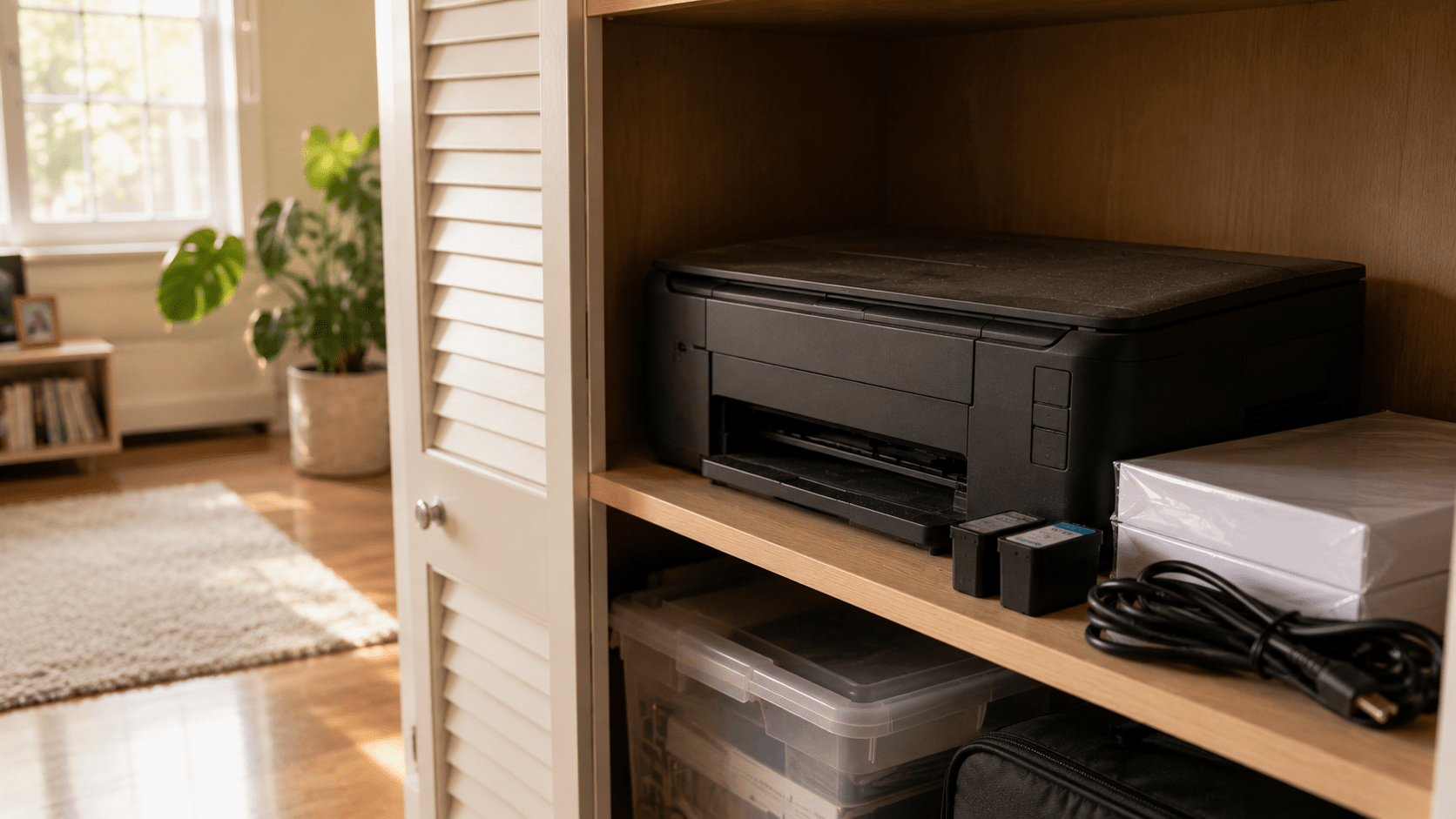
A printer that still works doesn’t automatically need to be replaced. The better question is whether it still has a place in your daily routine. Many printers spend years sitting in closets or garages as the way we work and study changes. If yours hasn’t been used in a long time, it may be time to decide whether it belongs in your home—or whether it’s ready for its next chapter.
Walk into almost any garage or storage closet, and there’s a good chance you’ll find a printer quietly waiting on a shelf.
The power cable is still wrapped around it. There’s probably a stack of unused paper nearby and maybe even a few unopened ink cartridges. Nothing appears to be wrong with it. If you plugged it in today, it would probably print just as it did years ago.
And yet it hasn’t been part of your routine for a very long time.
Unlike a broken appliance, a working printer creates a different kind of question. Throwing it away doesn’t seem right, but keeping it forever doesn’t feel like the perfect answer either.
There was a time when printers were essential in almost every home. Homework, travel itineraries, recipes, tax documents, family photos, and permission slips all seemed to pass through them at one point.
Then, everyday habits slowly changed.
Cloud storage replaced filing cabinets. Digital signatures became widely accepted. Schools and businesses adopted online platforms, and many forms that once required paper moved to a screen instead. Even airline tickets and restaurant menus became something we carried on our phones instead of in our hands.
The printer didn’t stop working.
Our routines simply stopped asking for it every day.
That’s why so many households still own perfectly functional printers that haven’t been turned on in years. They weren’t retired because they failed. They were quietly left behind as everyday life evolved.
The answer depends less on the printer and more on your routine.
Some families still print school assignments every week. Home offices regularly need invoices, contracts, shipping labels, or signed paperwork. Photographers, artists, and small businesses may rely on printed materials every day.
For those situations, keeping a reliable printer makes complete sense.
For many other households, however, printing has become an occasional task. A nearby shipping center, office supply store, library, or workplace may already cover those needs. If your printer hasn’t been used for several years, it’s worth asking whether you’re keeping it because it’s useful—or simply because nobody has decided what to do with it.
Many people are surprised to learn that some printers store information.
Depending on the model, a printer may contain Wi-Fi settings, saved network credentials, print history, scanned documents, address books, or internal memory used to process print jobs. Business printers and multifunction devices often store even more information than home models.
Before letting a printer leave your home or office, it’s worth reviewing the manufacturer’s instructions to reset or erase stored data whenever that option is available.
Once that’s done, the next step is deciding where the printer should go.
At eSmart Recycling, we accept inkjet printers, laser printers, all-in-one printers, commercial office printers, and multifunction devices, along with computers, laptops, networking equipment, monitors, phones, cables, and many other electronics. Every printer is evaluated individually to determine whether it can continue serving another purpose or whether its materials should be responsibly recovered. For devices that store information, secure data handling is also part of the process.
Many people assume the story ends once the printer leaves the house.
In reality, that’s where a different process begins.
Some printers still have years of useful life ahead of them and may be suitable for refurbishment. Others contain metals, plastics, and electronic components that can be recovered and returned to manufacturing instead of remaining in storage or ending up in a landfill.
Giving a printer a responsible destination isn’t only about clearing shelf space. It’s also about making sure the materials and information it contains are handled appropriately.
A printer that still works isn’t automatically a printer you still need.
Technology changes alongside our habits, and a device that once played an important role may quietly become something we rarely think about. That doesn’t mean it has lost its value. It simply means its purpose may have changed.
If your printer still supports your work, your business, or your family’s daily routine, it has earned its place. If it has spent years collecting dust on a shelf, it may be time to let it begin a different chapter.
Sometimes the best question isn’t “Does it still work?”
It’s “Does it still have a job to do?”






Did you enjoy our latest blog articles just above?
Subscribe to receive new stories, insights, and impact updates straight to your inbox.
We’ll send you curated content about our partners, recycling strategies, success stories, and how your involvement is driving change through technology access and digital empowerment.
💡 No spam, just the smart stuff.